Thank you for using Nota.
Because Nota has been in closed beta, an invite code has been required in order to sign up.
However, this week Nota launched its open beta.
This means that anyone can sign up and use Nota without an invite code from an existing user.
We hope you enjoy using Nota and sharing the service more casually with your friends or colleagues.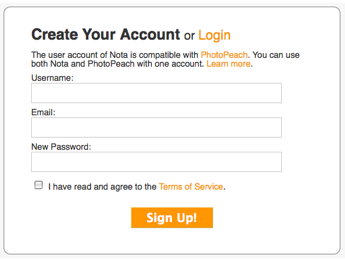
Further, taking this opportunity, we revised the
whole design of the Nota website.
We have added some new contents, such as the "Nota Quick Guide".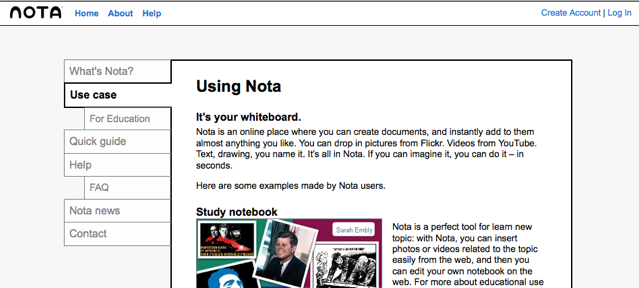
We are happy to hear your comments on the new Nota!

Showing posts with label updates. Show all posts
Showing posts with label updates. Show all posts
Wednesday, February 4, 2009
Nota Open Beta Version Released

Thursday, July 31, 2008
Breaking News: Nota an Official Partner at Creative Commons iSummit '08 in Sapporo
Hey Everyone!
We are very excited as Nota is an official partner of Creative Commons at their iSummit in Sapporo, Japan. Here is a description of the event from the site:
Inspired by Japanese innovation and hosted in a city fast becoming recognized for its modern, creative, technology-orientated approach to business and public initiatives - this year's iSummit will be a ground-breaking event that showcases pioneering approaches to furthering digital culture around the world.
At our booth in iSummit we are showcasing our C-shirt concept using Nota technology to design and edit remixable shirt designs. Participants can print their own C-shirts right there. Some people are ordering as many as 7 at a time!
We have also added lots of great new Clip Art for everyone to use making new designs better all the time.
Note: for this special campaign we have temporarily opened registration to iSummit participants only and it will close on August 1.
As always, please feel free to share your opinions about Nota on our Contact page, or here in the comments.
Love,
Ben
Nota Community Guy
Thursday, July 24, 2008
All-New Feature From Your Feedback: Private Nota!
Hi Everyone!
I am happy to announce that our team has developed a new feature straight from your feedback: Private Nota.
If you visit your Home page there is a new layout with sections for your private and public nota via thumbnail view.
Here is how it works:
- From the home page, click the '+ new' button to start your desired type of nota
- If you want, share the URL of your private nota to collaborate with friends or peers
- If and when you want to make your nota public click 'remix it' to make a public copy
Now you can keep projects private indefinitely or just work on your creations until you are satisfied with the result and then make them popular.
Feature Note: Embedding a private nota will result in an access denied message in the frame.
The Nota team has immediately begun using this for our own purposes and we hope you find it useful too. =)
P.s. Don't hesitate to let us know what you think! We love implementing your feedback.
Thursday, July 17, 2008
New Features: Font Art, Post to Blogger & LiveJournal Buttons, and More
Hey everyone!
This week we are introducing three new features to make your Nota experience better:
- Font Art
- Embed straight to Blogger and LiveJournal buttons
- New Clip Art
With the Font Art feature you can select from 5 new fonts.
Just:
- Choose a font you like
- Enter your desired text
- Click 'add' - the tool will automatically render the Font Art in your nota canvas.
From there you can customize your new Font Art the same as a shape- move, resize, change colors, and adjust transparency.
This way you can have font options that add more personality to your nota and you dont have to wait while the page is loading entire font sets.
We have also added new clip art for you in edit mode with the theme 'Happy Drive' and there are some great characters and images to use (as seen in the Weekly Nota above). When you are all done and want to share your nota on Blogger and Live Journal you can use the new embed buttons for them in view mode.
Thats all for now, and here is your Tip of the Week:
Did you know you can use the Ctrl key+ the mouse scroll wheel to zoom in and out in edit mode?
This is very handy if you have moved a window off the normal screen and cant click on the move button or the X button to delete, or just want to get a zoomed out view of your whole nota.
Please leave us any ideas or feedback you might have!
Love,
Ben
The Nota Community Guy.
Nota Supports Flash Player 10
Hi,
We inform you that Nota supports Adobe Flash 10.
We are currently testing Nota under Flash Player 10 beta 2, and it's running well.
Thursday, July 10, 2008
Weekly Update: New Clip Art and Your Friend's Comments Feed
Hi everyone!
This week you have two cool updates:
- New Clip Art in the Sidebar to Play with and...
-Comments your friends have left on other Nota are now included in your news feed.
Beginning this week we will be adding new clip art to the sidebar weekly. We hope this will allow the creation of better and better creations all the time. Also, when you check your main news feed you may notice : "Ben left a new comment for Jen". Now you can enjoy the Nota your friends are commenting on.
And now, here is your Tip of the Week:
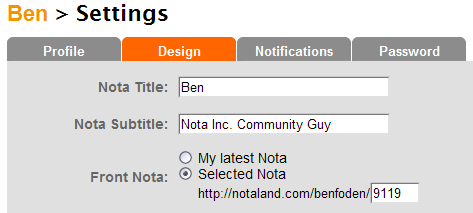
You can set a particular Nota to be displayed on your MyNota page by entering the page number into the settings customization page.
For example:
Leave us any comments or feedback you may have-- we would be happy to incorporate your ideas into the site.
Love,
Ben
The Nota Community Guy
Thursday, July 3, 2008
New This Week: new MyNews and Clipart Features
Hey everyone!
This week we have two very cool new features:
1. Nota News - this shows you all the latest activity around your Nota
2. Clipart - the display for clipart is now an accordion style so you can more easily grab clipart (tons of new clipart will be added soon!)
Now through Nota News you can check for updates to all the different kinds of activity going on around you in Notaland. For now there are four feeds:
- an 'all' feed showing all Notaland activity
- a comments feed with all comments you have recieved on your Nota
- a shared feed with all activity in your shared Nota
- a ratings feed with all ratings you have recieved on your Nota
In the editing view you can now see clipart galleries expand in an accordion style that makes it much easier to use than the previous style with a drop box. Also, please look forward to see lots of new vector clipart for you to use in the near future.
Thats the news and....
Here is your Tip of the Week:
When you use the text tool you can choose a color for the text box background.If you highlight the text you can change its color, if you leave the selector at the end of the text you change the background color.
We have many big changes coming up to make Nota more fun and powerful.
Please give us any feedback or comments and we'll try our best to put them into effect on the site.
Thanks for enjoying Nota and please stay tuned for lots of great updates in the near future.
Love,
Ben
The Nota Community Guy
Thursday, June 26, 2008
Weekly Update: Invitations, Profile Pictures, and Wikipedia
Hello Everyone,
Before we share the latest info about Notaland with you we want to say thank you for using our service, providing wonderful feedback, and recommending us to your friends!
This week's new releases are the addition of a profile picture feature, and wikipedia content search from the sidebar.
Go ahead and surf over to your settings page and you will see a browse button where you can upload a profile picture to appear on your MyNota page.
You can now also search for and drag wikipedia content from the sidebar of the Nota Mixer to enrich your creations.
And now, here is your Tip of the Week:
With the frame button at the top of the mixer you can add or remove the white border and cut your photos into different shapes with one click!

Please feel free to give us any and all feedback or comments you may have so we can accomodate your wants and needs as best as possible.
Love,
Ben
The Nota Community Guy
Thursday, June 19, 2008
New: Rating System and Related Nota View
Hello Everyone!
We have released two new features from our international development team this week.
You are now able to rate Nota from Awesome (5) to Keep Trying (1). You can also see thumbnails of related Nota in the viewing sidebar to explore other Nota you might be interested in.
Rating works on a one through five system where all of the ratings given will be used to create an average. The Nota with the highest average rating will join the new "Top Rated" gallery descending and in this way you decide which Nota will be popular.
In the sidebar of the Notum view there is now a related page section which displays Nota similar to the one being viewed. This is first done by the similarity of text contained within, and second by the user who has made it.
Finally, here is your Tip of the Week:
When editing a Notum you might have noticed some objects move to the front or the back automatically. The way this works: larger objects are automatically moved to the rear and smaller ones to the front.
Please enjoy our new features and feel free to give use any and all feedback or comments you may have.
Love,
Ben
The Nota Community Guy
Friday, June 13, 2008
iPhone Support

Now you can watch Nota on your iPhone or iPod Touch.
Thursday, June 12, 2008
Search, Permission, Embed Features and a New Use Tip
I'm happy to announce our development team has completed several new features this week.
You now have a handy search feature-- search Nota by keywords in their title and content text.
- The results can be sorted by relevance, date updated, and views.
- Also you can choose how they will be displayed - either a thumbnail view or detailed list view that allows you to read the text from within the Nota right there.
The next new feature being introduced today is the ability to allow or disallow commenting on your Nota.
Finally you now have advanced embedding options-- choose to embed the Nota itself or just an image of it and also change the size it will be displayed and Scrollbar options.
Tip of the Week
Did you know you can Ctrl+click any objects in a Nota to move them together just like you are used to on your OS?
Similarly, if you Shift+click objects you can proportionally resize them as well.
I didn't know this when I first used the Nota mixer but it has made changing layouts easier than ever!
Thank you and I hope you enjoy our service.
Love,
Ben
the Nota Community Guy
Thursday, June 5, 2008
New Nota Facebook Application and More
Hello Everyone,
First I would like to introduce myself briefly as I am new with Nota.
My name is Ben Foden. As the Community Guy I hope to talk with all of you in order to make Nota the best experience possible. I am currently an undergraduate student of International Business at Whittier College. I was born and raised in Mountain View, CA (now Google's hometown too).
Aside from that I would like to introduce Scrapbook, our new Facebook Application!
You can check it out here.
Scrapbook gives you the familiar Nota editing frame along with access to your Facebook Album and tagged photos. You can drag and drop into the editor and then easily post them to your wall for sharing with your friends.
Check it out today and please let us know what you want on the new Contact Us page at notaland.com/contact.
Thank you for all your support and any feedback is much appreciated.
Thursday, May 29, 2008
New MyNota Design
Hi everyone,
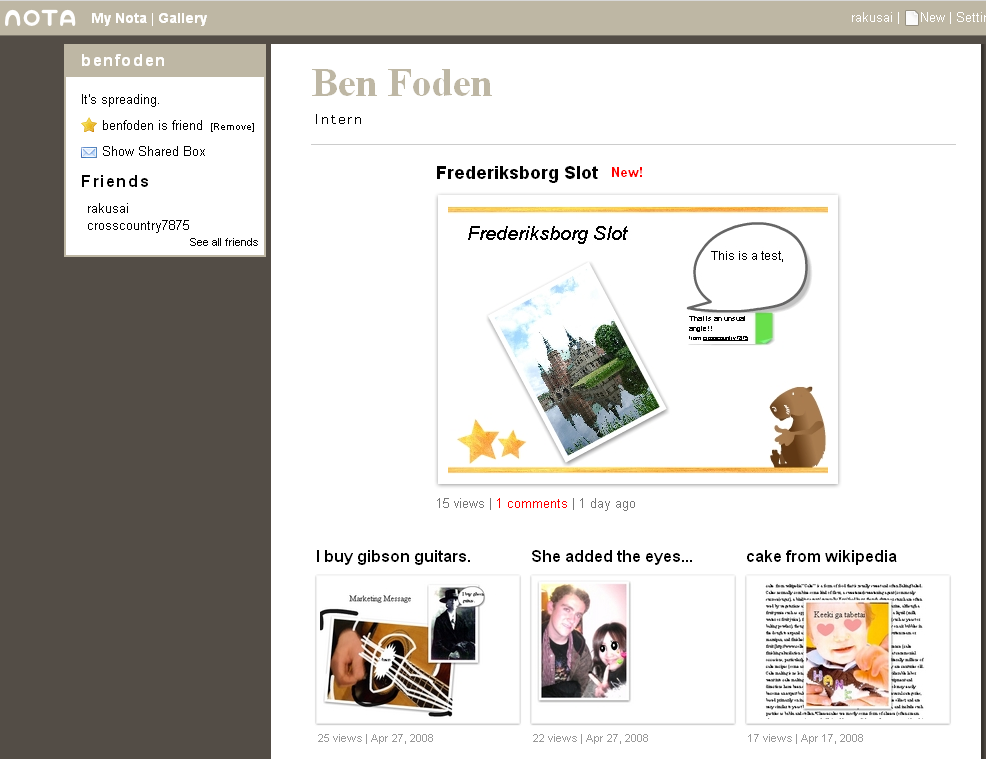
We have changed the design of the"My Nota" page and improved several existing features.
The New "My Nota" Page
Now you get a big picture of your latest Nota on the top and thumbnails of past Nota down below. By clicking the "show more" link you can go see the rest of your Nota.
Easy and accurate font size control
Just click "A+" or "A-" to control the text size. You don't need to select the numbers but if you want to choose a specific font size you can input a number manually.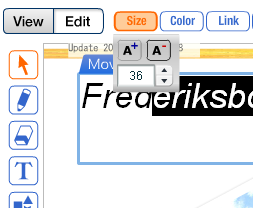
Add a link to other Nota pages in your Nota canvas
Find other Nota in your sidebar.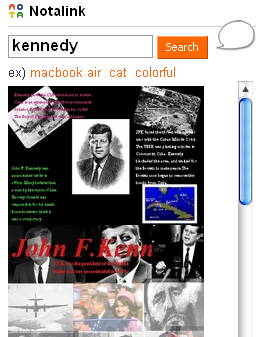
Wednesday, May 14, 2008
Sidebar from right to left
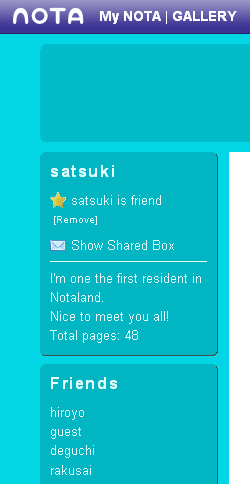
We moved the sidebar of "My Nota" and Editing Page from right to left and simplified the header.
We Hope you like our new design!
Monday, May 12, 2008
Featured Page
Today, we released our "featured" page for popular Nota.
You can check out the featured Nota here:
http://notaland.com/featured
You will also see featured Nota on the home page from now on.
http://notaland.com/
Tuesday, April 22, 2008
Resize and rotate Youtube Video
Today, we have released folloing functions:
- Users can now rotate and resize Youtube videos!
- New "view | edit" mode-switching button
- The Comment cursor will appear over the canvas.
- Tooltips for the editing tool
- Simplified & smarter insert function.
- Big header including subtitle for your Nota.
We hope you have fun with these functions!
Sunday, March 23, 2008
New Feature Update - Comment -
Now we have added three new features: WatchList, Comment, and New MyPage.
WatchList
You can add your friends on your Nota by clicking the "Add to WatchList" button on someone's nota. If someone in your WatchList has updated pages, you can see the name of friends has bold styling.
Comment
Put stylish comments anywhere on the pages. It's easy, quick, and fun! Just try it.
New MyPage
We updated your Nota top page. Now it has a better design than ever before. You can even customize the header or background colors by clicking the "Settings" button.
Wednesday, February 20, 2008
Grab it!!
We have released a new interface for Nota.
In the new Nota, the "Grab it" function is accentuated.
Enjoy it!
http://www.notaland.com
Friday, January 25, 2008
Nota is the world's first interactive web canvas!
Hi Everyone,
We changed our catch phrase for Nota. It says:
Nota is the world's first interactive web canvas where you can stylishly express yourself in no time.
I like the word "web canvas" because it stands for the free editing feature of Nota.
Besides, our new logo phrase is going to be "Grab it. Make it. Share it". It simply represents "Remix" in three words. I hope all of you like this.
You can see our meeting log here on my Nota.
Friday, January 18, 2008
Take a Shot!
Now, our new web service 'Take a Shot' has been made available to the public.
It's a very easy service, yet very powerful--
now Nota has a webcam eye.
Please tell your friends or families about 'Take a Shot'.
We are very appreciative of any feedback you might have.
Thank you!
Visit Take a Shot
Subscribe to:
Posts (Atom)

